我的ESP32實做書籍:https://youyouyou.pixnet.net/blog/post/121105860
博客來網址:https://www.books.com.tw/products/0010901195
ESP32-CAM是ESP32為主版並外掛相機,ESP32本身就已經內建WIFI跟藍芽,而ESP32-CAM竟然還加了相機給你,而這樣的東西竟然不到三百台幣,這樣的好東西當然要發揮他最大效能。
ESP32-CAM is an extended dev board based on ESP32 which already built-in WIFI and BT4.0. Additionally, ESP32-CAM combines ESP32 and OV2640, and only costs about US 7$.
ESP32介紹: http://youyouyou.pixnet.net/blog/post/119410732
ESP32-CAM介紹: http://youyouyou.pixnet.net/blog/post/119383183
本次要介紹的主題是當作門禁,透過人體感測器,感測到活動時自動拍照,並存在SD卡中。
This post introduces how to use ESP32-CAM and PIR(SR501) as a surveillance camera and will take pictures to save to sd card when people active.
一、ESP32-CAM環境架設(ESP32-CAM Arduino IDE environment setup)
二、材料準備及接線(Material prepare )
三、程式撰寫(Source code)
四、程式上傳並測試(Upload and test)
一、ESP32-CAM環境架設(ESP32-CAM Arduino IDE environment setup)
關於環境架設,請參考這篇前作ESP32-CAM介紹: http://youyouyou.pixnet.net/blog/post/119383183,依照步驟完成環境安裝並測試。
About ESP32-CAM arduino IDE environment setup, you can follow this post.
二、材料準備及接線(Material prepare )
本次須準備的材料包括
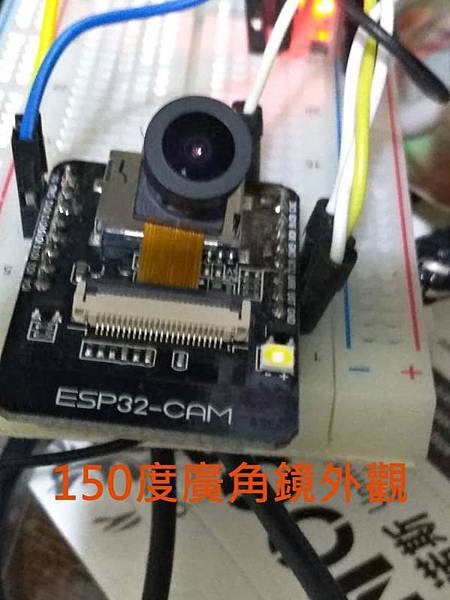
- ESP32-CAM dev board主版,這次本人使用廣角鏡頭,視野真的變得很廣,露天搜尋: https://goods.ruten.com.tw/item/show?21910115309507

- USB-TTL(本人使用Prolific USB-to-Serial TTL: http://youyouyou.pixnet.net/blog/post/119643042 ,但個人不推這款)
- 人體感測器(SR501)
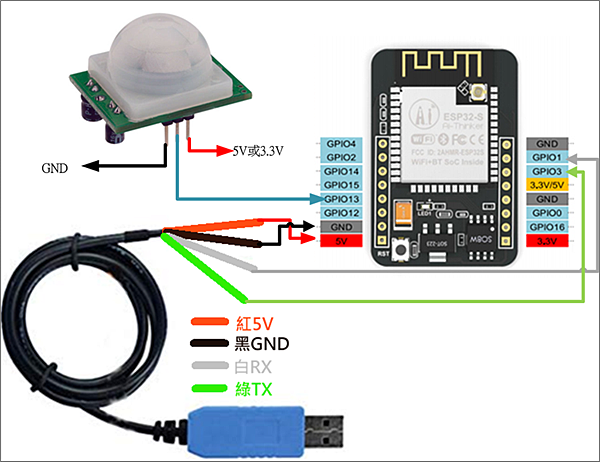
接線方式
- 先依照上圖將USB TTL與ESP32-CAM連接,紅->5V、黑->GND、白->U0T、綠->U0R。connect USB TTL to ESP32-CAM by this table.
USB TTL ESP32-CAM 紅 5V 黑 GND 白 U0T 綠 U0R - 將人體感測器與ESP32-CAM連接,VCC->5V或3.3V、OUT->IO13、GND->GND。connect SR501 to ESP32-CAM by this table.
SR-501 ESP32-CAM VCC 5V或3.3V OUT IO13 GND GND - 另外準備一條母母杜邦線,燒錄時,需要將ESP32-CAM的GND->IO0對接,燒錄完後拆除。you also need a line for connecting GND and IO0 while uploading.
三、程式撰寫(Source code)
本程式修改於(My codes mainly referred to this post): https://github.com/v12345vtm/CameraWebserver2SD
修改的地方包括My codes have those advantages
- 刪除所有臉部辨識部份,主要是效能差,且無法記憶,重開機就須重新設定
Delete all face regnition function - 將程式縮小到可以OTA的狀態
reduce codes for OTA - 刪除不必要的列印
delete redundant print codes - 註解相關程式說明
remark codes - 加入拍照函數:getPic
add new function : getPic to take pictures
完成的內容以放置git,放在本文最下方(The source codes were shown below)
四、程式上傳與測試(Upload and test)
1.複製下方的程式碼 (copy source code to your arduino IDE)
2.上傳程式前,先將GND與IO0對接 (connect GND and IO0 while uploading)
3.選項請依照下方規定,除了port之外 (upload options follow this picture)

4.上傳時,出現「connecting.........._______...........」時,按下reset (press reset whlie "connecting.........._______...........")

5.等候更新成功訊息出現 (done)

6.查看Serial視窗出現的內容 (message in serial monitor )

7.每當偵測到人體活動時,就會直接拍照,並存放在SD卡內,並依序編號 (pictures will auto take while people active in front of the camera)

8.若要直接查看影像,可透過http://ip,直接查看串流內容 (you can also watch the video stream in http://ip)

目前研究到利用.net讀取mjepg stream資料,並利用雲端分析物件,但這又是一個很長的故事。
And now, I try to get ESP32-CAM stream in .net framework and do some object recognition function.

教學、研習邀約請洽LineID:youjunjer
可開課程: 貨架電子紙標籤,IoT Arduino esp32 教學,esp32com 影像辨識pos機,藍牙beacon偵測,unity ARVR互動,AI臉部辨識,機器學習。

請先 登入 以發表留言。